Standing desks · Comparison
FlexiSpot E7 Pro vs Secretlab MAGNUS Pro: which desk fits?
Choose around the parts of your workday you want to simplify: arranging the surface, reaching connections and keeping useful equipment.
The quick decision
Which option fits your day?
Choose E7 Pro to build around a preferred desktop material and a layout with rearward supports. Choose MAGNUS Pro for built-in power routing and top access to the cable tray. Check your chair, mounts and exact US configuration before choosing either.
FlexiSpot E7 Pro
Start with the desktop material you want, then arrange the chair, storage and mounts around it.
Secretlab Magnus Pro
Choose power through the leg and a hinged rear tray when access to connections matters most.
- Working positions, chair access and mounting space can rule out a setup
- Confirm the US electrical version, included accessories and return terms
Research-based guide. DeskSpaceLab has not tested these products head to head. Sources and review scope
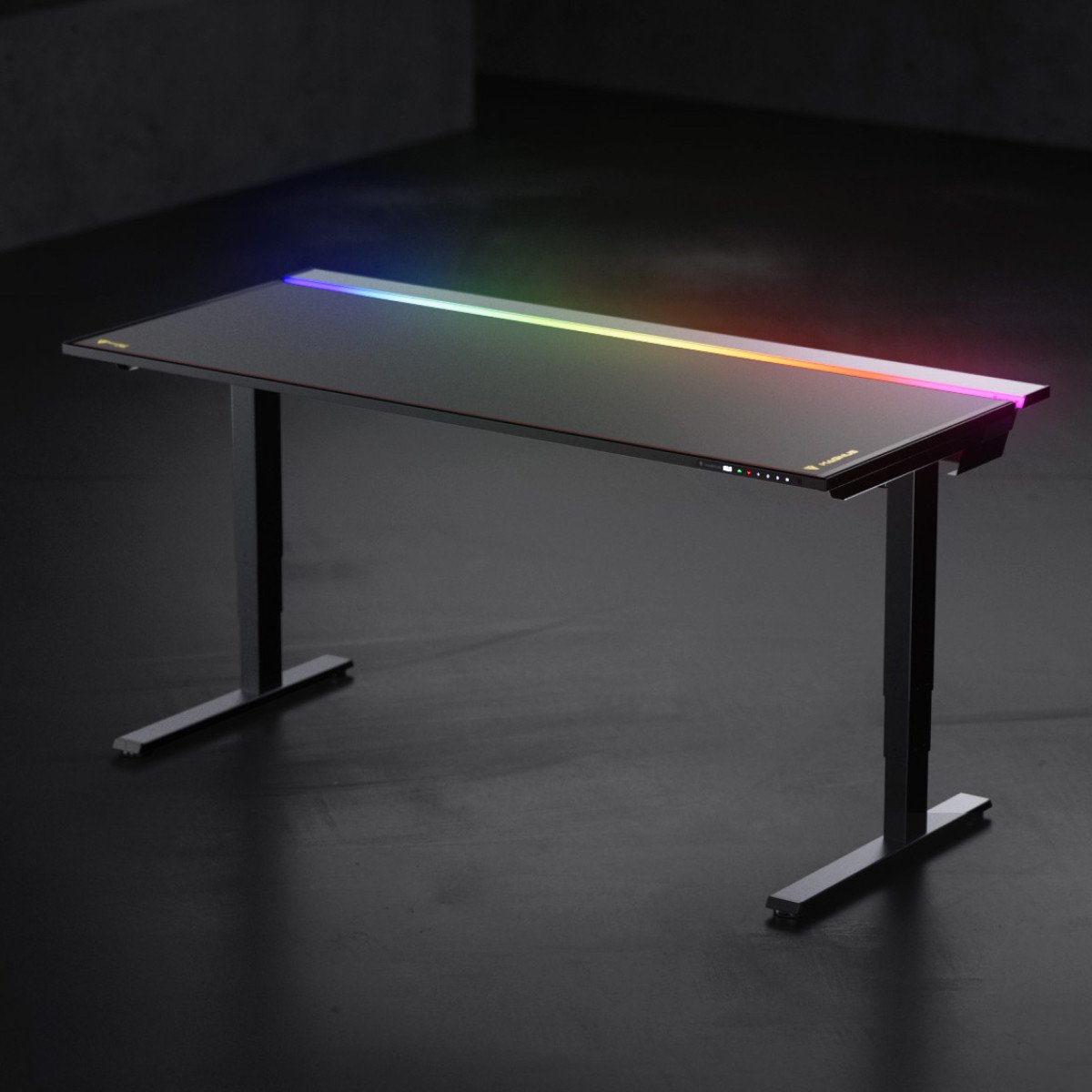
You should be able to open a notebook without moving yesterday's cables, pull your chair close and reach a connection when you change equipment. These desks approach that everyday order differently. E7 Pro lets you begin with the surface and underside layout you want. MAGNUS Pro makes the route from the outlet to your equipment part of the desk itself.
That difference is more useful than choosing an “office” desk or a “gaming” desk by appearance. Both still need a suitable place for your screens, chair and attachments. Neither makes an incompatible monitor arm fit.
E7 Pro: start with the material you want
If a bamboo desktop belongs in the room you picture, E7 Pro gives that preference a place to start. FlexiSpot offers desktop-material choices, so you can plan around a surface you want to see every day rather than choose the frame first and accept whatever top follows.
Underneath, Pro's semi-C supports sit toward the rear. Think about a drawer near the front and the route your chair takes toward the keyboard: the support arrangement is worth examining when those parts of your setup currently compete for space. It is an option to plan around, not a promise of more room for every chair or accessory.
Pro also has cable storage. FlexiSpot describes a tray and fabric cover for organizing leads beneath the surface, alongside memories for desk positions you choose. Your power strip, adapters and wall connection still need a plan. Check which controller and cable pieces accompany the exact version you select.
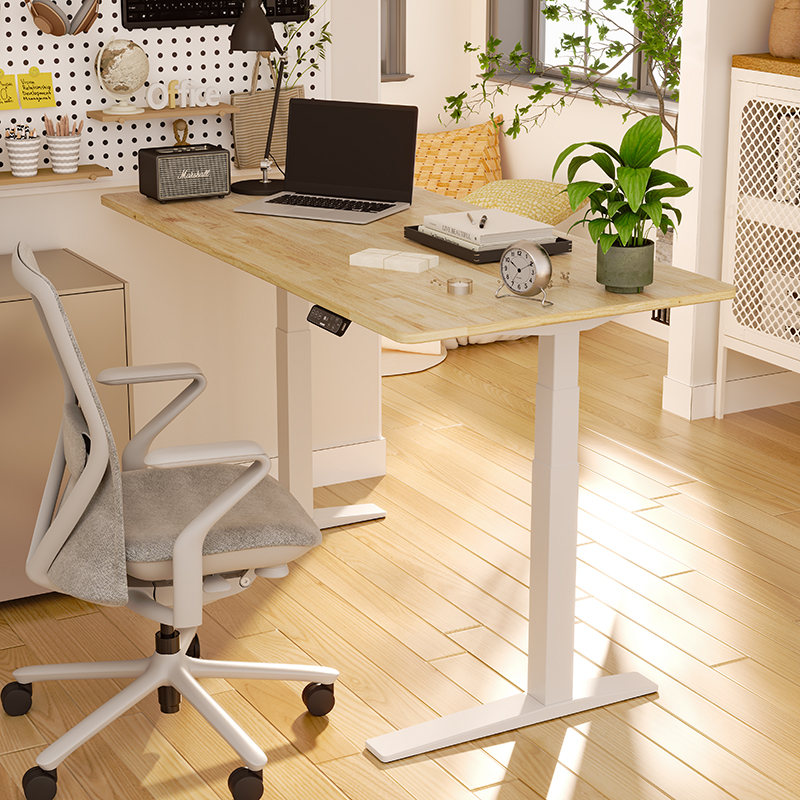
Shortlist E7 Pro when the surface and the arrangement beneath it are the changes you most want to make.
View FlexiSpot E7 Pro at FlexiSpot
Manufacturer link, not an affiliate link.
MAGNUS Pro: give the adapters somewhere to go
MAGNUS Pro routes power through a leg to a socket at the desk. That gives the connection from the floor a defined place, while a rear tray holds the equipment's remaining leads and adapters. Your monitor still has a cord; the benefit is a planned route rather than a cable-free workspace.
The hinged rear cover is the more useful distinction if you regularly reconnect equipment. You can open the connection area from above to arrange an adapter or change a plug. Plan where those parts will sit and how the cover will open once your screens are installed. A tidy promotional photograph cannot settle either question for your equipment.
Standard and XL are MAGNUS Pro options. Coordinated mounts and routing accessories may appeal if you want to build within the same system, but identify the parts your setup actually needs. Select the US electrical version and check the included items; lighting and accessories in a finished setup are not automatically a bundle.
Shortlist MAGNUS Pro when built-in power routing and access to the rear connection area answer your main frustration.
View Secretlab Magnus Pro at Secretlab
Manufacturer link, not an affiliate link.
Picture the same monitor arriving at either desk
Imagine adding a second screen while keeping an arm and drawer you already like. With E7 Pro, your first question is whether those attachments can share the selected top and rearward frame. If they can, the desk lets you build around the surface you wanted while grouping the new screen's lead beneath it.
With MAGNUS Pro, the appeal changes: you want somewhere to put the new adapter and a convenient way to revisit its connection. That makes the rear tray useful to investigate, provided your arm uses an approved attachment position and leaves the cover free to open. The cover itself is not a place to clamp or support equipment.
If your existing arm or drawer cannot work with the chosen desk, that changes the decision. Include its replacement in the order you compare. Keeping useful equipment may matter more than the desk's overall look.
Leave room for the parts the photographs cannot settle
Check the completed desk at your seated and standing positions, with room for the chair to approach. Cables must accommodate movement. On MAGNUS Pro, a computer mounted beneath the top can also limit how far the setup can lower; follow the manual for the complete arrangement.
For E7 Pro, confirm the exact version, included parts and matching instructions before ordering. Use the current seller information to check your intended mounts; the photographs here do not establish the version you will receive.
Compare complete orders, including necessary mounts, delivery and assembly. Ask about disassembly, packing and return-shipping responsibilities before treating either desk as a trial at home. Current stock, a particular saving and free return freight are not established by this comparison.
Choose the job your desk should do
Choose the E7 Pro approach when a preferred top and its underside layout make the change worthwhile. Choose the MAGNUS Pro approach when integrating power and revisiting connections matter more.
If you want a different frame arrangement, the E7 family comparison also considers original E7 Plus. If your present surface and working positions already suit you, try the cable-management guide first. Giving the adapters a better home may solve the problem without replacing the desk.
Sources and review scope
US product descriptions checked October 29, 2026: FlexiSpot E7 Pro and Secretlab MAGNUS Pro. Scope: E7 Pro US and MAGNUS Pro standard/XL US. Fixed MAGNUS and MAGNUS Evo are separate models; see the Secretlab FAQ. Product descriptions establish features, not a selected cart or comparative performance.
The MAGNUS Pro manual was reviewed October 29 for cable movement, mounting, rear-cover and assembly guidance. The newly linked E7 Pro manual was not read. Use FlexiSpot shipping and returns as a starting point, and ask either seller for the terms of your selected order; those contractual terms were not verified here. DeskSpaceLab has not tested either desk or performed a head-to-head comparison.
About this guide: DeskSpaceLab Comparisons · Our editorial approach and affiliate policy